Meet the Client
Davie County, North Carolina spans 264 square miles of piedmont countryside just north of Charlotte. Carved from Rowan County in 1836, this county of 41,000 residents balances rural character with growing suburban needs. Like many counties its size, Davie faced a classic problem: essential government processes still ran on paper, and contract approvals were stuck in the analog age.
Daily Detour: Contracts played hide-and-seek with accountability
Picture this: a department needs to approve a vendor contract. Staff printed a Word document, attached it to the physical contract, and sent it on a journey through multiple departments. No one knew where contracts were at any given moment. There was no defined review order. Contracts got lost. Deadlines slipped. Changes required starting the whole paper shuffle over again.
The real pain? No visibility into the approval chain. Staff couldn’t track progress. Managers couldn’t identify bottlenecks. The county had no way to ensure every required signature was collected before finalizing agreements. Important contracts sat in someone’s inbox while vendors waited and projects stalled.
Manual routing meant constant interruptions. Phone calls asking “Where’s that contract?” became part of the daily routine. Staff wasted hours hunting down paperwork instead of doing their actual jobs. Budget-critical agreements took weeks to process when they should have taken days.
About our Client
CLIENT NAME:
CHAMPION:
Sonia Acosta
Records Technician
POPULATION:
est. 41,000 residents
SOLUTIONS:
The Solution: Automation that actually makes sense
Davie County partnered with MCCi, a trusted Laserfiche solution provider, to redesign their contract workflow from the ground up. The county deployed Laserfiche Forms, Workflow, and DocuSign integration to create a completely digital approval process.
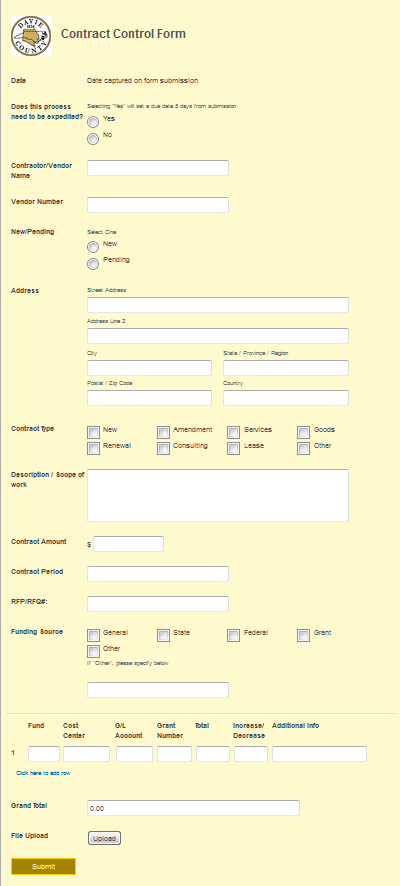
Here’s how it works now: when a new contract needs approval, staff fill out a Contract Control form in Laserfiche Forms. They enter contract details and upload the document. They select whether the contract needs regular or expedited review. One click submits it.
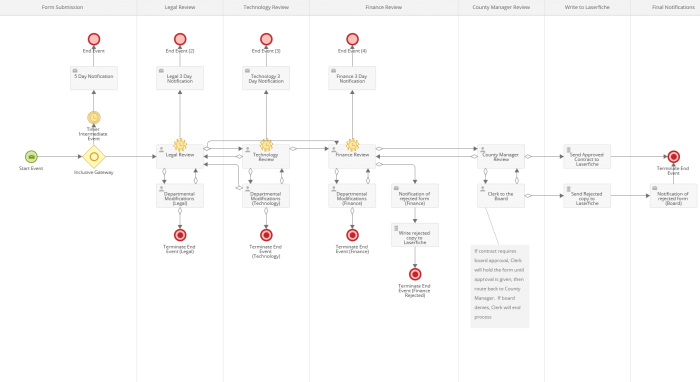
The system automatically routes the contract to legal review first. Legal approves it or sends it back with specific feedback. For technology purchases, the workflow routes to IT review. Then finance reviews it. Each step happens automatically based on the contract type.
After finance approval, the contract goes to the county manager. If board approval is required, the manager sends it to the clerk. The clerk presents it to the board and records the decision. Approved contracts move to a designated folder where they await signatures.
The system includes built-in accountability. If a contract sits for three business days without review, the county manager gets an automatic email alert. Expedited contracts trigger alerts if they’re not approved within five days.
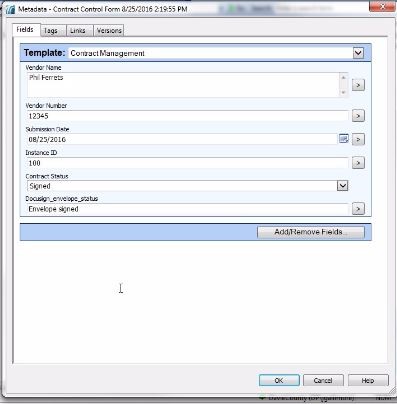
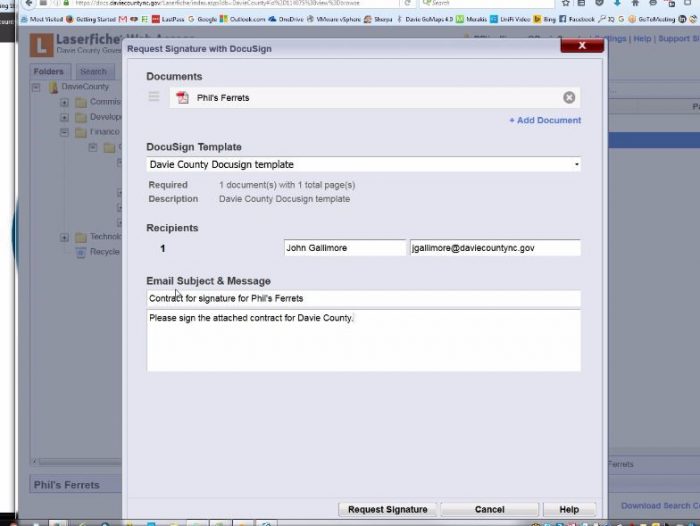
Once internally approved, staff right-click the document and select “Send to DocuSign.” The contract goes directly to the vendor for electronic signatures. When signed, Laserfiche Workflow automatically files it in the Finalized folder and updates all metadata.
Throughout the implementation, MCCi provided Laserfiche training to ensure staff could use the new system confidently. Ongoing Laserfiche support keeps the workflow running smoothly as county needs evolve.
The Results: From paper chaos to digital clarity
Davie County now has complete visibility into every contract approval. Staff know exactly where each contract sits in the review chain. Clear workflows eliminated the guessing game. Contracts move through approvals faster because everyone knows their role and deadline.
Lost contracts became a thing of the past. Digital storage means every document lives in one centralized location. Staff with proper security rights can access contracts from anywhere, anytime. No more physical file cabinets. No more wondering if the original is still floating around.
Accountability improved dramatically. The system tracks who reviewed what and when. Managers can identify bottlenecks immediately and address them. Staff can’t claim they never received a contract when the system shows it in their queue.
Processing time dropped significantly. What used to take weeks now takes days. Electronic signatures through DocuSign eliminate mailing delays. Vendors get faster responses. Projects move forward without approval-process bottlenecks.
The county cut printing and storage costs. Going paperless from start to finish saves money on supplies, filing space, and staff time. Those savings add up quickly across hundreds of contracts per year.
Perhaps most importantly, staff can focus on meaningful work instead of paper-pushing. They spend less time tracking down documents and more time serving residents. That’s the kind of efficiency that makes government work better for everyone.
Laserfiche Features
Get more good days done with Laserfiche’s complete toolset for securing documents, automating repetitive tasks, and meeting compliance requirements.
All-in-One Solution
Laserfiche’s comprehensive repository system turns content chaos into streamlined operational power. Built for organizations that demand more than scattered files and inefficient workflows,
Laserfiche delivers centralized intelligence that drives results. Experience complete control over your content lifecycle with confidence that comes from true operational excellence.

Everything in one place, nothing gets lost.
The submitter fills out the Contract Control form in Laserfiche Forms with details about the contract and uploads the contract draft. The submitter can select if the contract requires regular or expedited approval.
Once the form is submitted, Laserfiche Forms sends the contract for legal review. Legal can approve the contract or automatically send it back to the submitter for modifications. If the contract relates to a technology purchase, legal can send it on for technology review, otherwise, the contract can be sent directly to finance.
Get rid of the busy work.
At any time during the process, if a department does not review the contract within three business days, an email reminder is sent to the county manager. If a contract requiring expedited review is not approved within five business days, an email is sent to the contract review team.
Keep records as long as you need them, then let them go
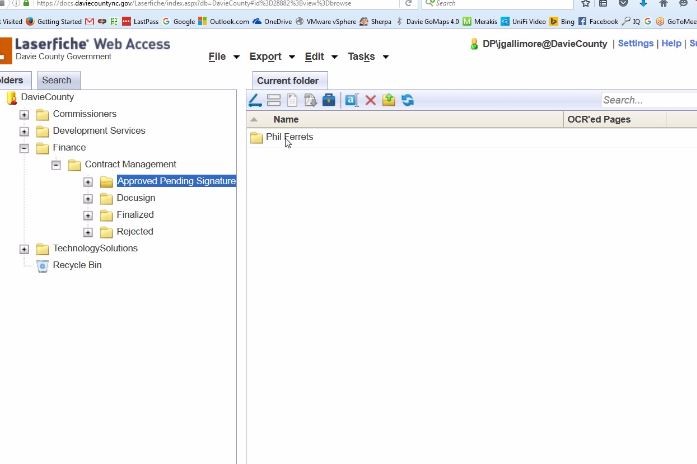
Once a contract is approved, it is saved in the repository in the Finance\Contract Management\Approved Pending Signature\Contractor Name folder.
Stop worrying about whether your data is safe.
Built-in enterprise-grade security ensures your data is protected, so you can focus on your work instead of lying awake at night wondering if your files are safe.
Your team uses different software for different things, and none of it talks to each other. Information gets stuck in silos, and you end up entering the same data multiple times. Connect your systems so information flows where it needs to go automatically. Less copying and pasting, more getting things done.