
Your daily admin tasks just got easier with Laserfiche 12.
As a Laserfiche solution provider with deep experience in public sector implementations, we thoroughly test every version before recommending upgrades. After extensive evaluation, our verdict is clear: Laserfiche 12 will reduce your administrative burden.
Our technical team evaluated these features specifically for municipalities, counties, state agencies, school districts, and special districts. Here’s what matters most for your daily workflow.

Laserfiche 12 at a Glance
Version 12 rolls out in phases through 2026, but the initial release includes three features that address the most time-consuming parts of your role:
Administration Hub: Centralized troubleshooting across your entire ecosystem
Metadata Enhancements: Drag-and-drop designer with conditional logic
Forms Test Mode: Safe testing environment without disrupting production
Stop Server Hopping: The Administration Hub
Picture this scenario: A critical Laserfiche Forms process suspends mid-workflow. Is it a Forms issue? Repository server problem? Workflow error? You start logging into multiple servers, checking event viewers, and manually piecing together logs.
This familiar frustration ends with the Administration Hub.
“You don’t have to hop over to five different servers to find a Forms log, a Web Client log, a Weblink log because it’s all in one spot,” explains Drew Ferrell, MCCi Manager of Support Services.
The Administration Hub centralizes your entire Laserfiche ecosystem into a single interface. Whether you’re troubleshooting independently or working with Laserfiche customer support, you’ll immediately see:
- Error origins across all modules
- Authentication and communication failures
- Complete system event timelines
- Cross-server activity patterns
Real-world impact: A suspended Forms process that previously required 30 minutes of detective work now takes 5 minutes to diagnose. The difference compounds when you’re managing dozens of workflows across multiple departments.
This streamlined approach particularly benefits government IT teams managing complex, multi-server environments with limited staff resources.

Metadata That Adapts: Dynamic Fields for Government Documents
Government records management demands precision. Property assessments need different fields than building permits. Tax exemptions require different metadata than budget documents. Yet previous Laserfiche versions forced uncomfortable compromises.
The new Metadata Designer in Laserfiche 12 changes everything.
What’s new:
- Drag-and-drop interface (similar to Forms)
- Checkboxes and radio buttons
- Conditional logic rules
- Side-by-side field placement
- Cleaner, more modern appearance
Our Systems Engineering Manager, Keith Hay, recently worked with a county assessor’s office managing real estate documents. They needed metadata templates for assessments, administrative appeals, income reports, sales verifications, and tax-exempt properties.
The old solution? Either make all fields optional (reducing data quality) or create separate templates for each document type (multiplying administrative overhead and confusing end users).
The Laserfiche 12 solution: Conditional rules dynamically show or hide fields based on the selected document type.
When a clerk selects “Administrative Appeal,” only appeal-relevant fields appear. Switch to “Real Estate Assessment,” and a completely different field set displays. This approach eliminates screen clutter and ensures accurate data entry.
[Video: Lead Solutions Architect Nathan Whicker demonstrates the Laserfiche 12 Metadata Designer in action]
For records managers juggling multiple document types across departments, this feature delivers immediate workflow improvements. Fields like “First Name” and “Last Name” can now sit side-by-side rather than stacking vertically, making forms easier to scan and complete.
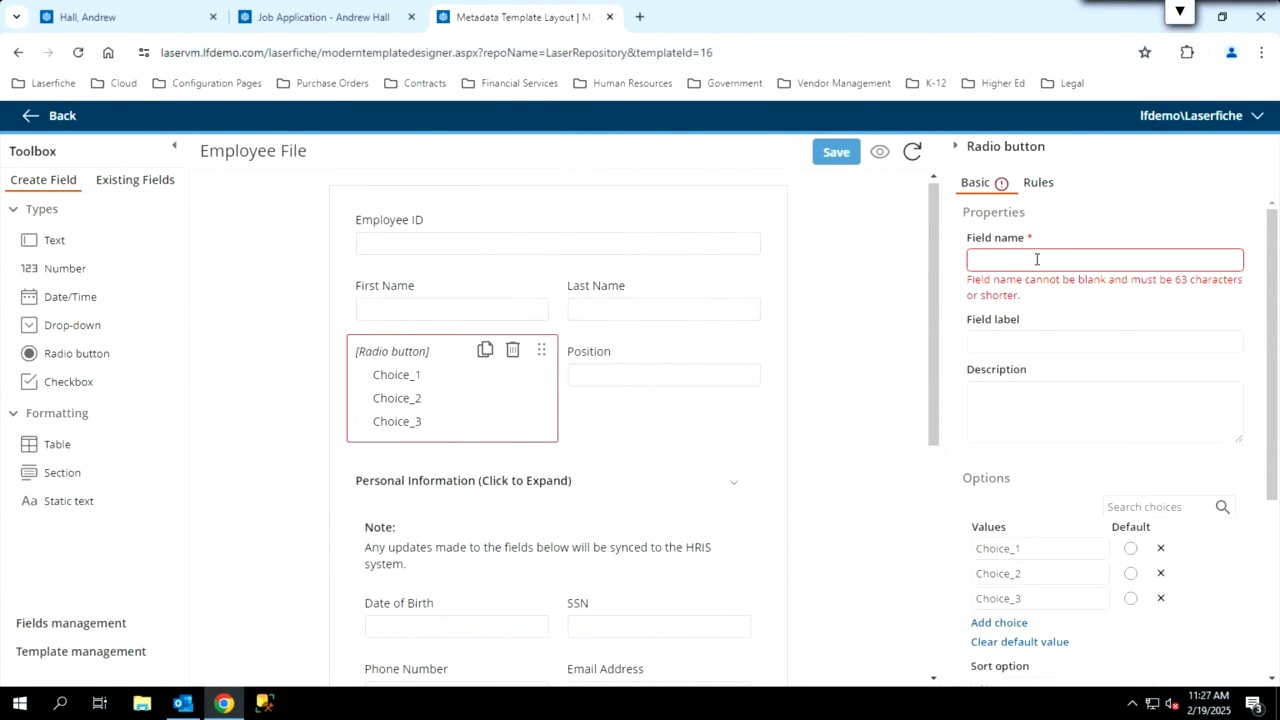
In this video clip, Lead Solutions Architect Nathan Whicker demonstrates how to use the new Laserfiche 12 Metadata Designer.
For records managers juggling multiple document types across departments, this feature delivers immediate workflow improvements. Fields like “First Name” and “Last Name” can now sit side-by-side rather than stacking vertically, making forms easier to scan and complete.
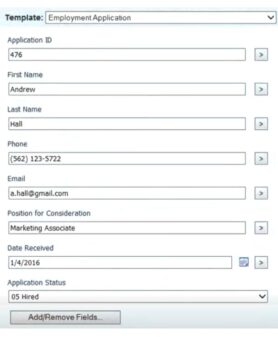
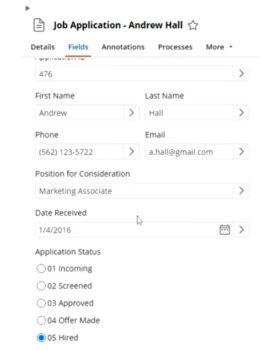
Test Without Terror: Forms Development Done Right
Every system administrator knows the anxiety of modifying production Forms. One wrong assignment change can redirect critical approvals to the wrong person. One missed reset can disrupt an entire department’s workflow.
Before Laserfiche 12, testing Forms meant risky workarounds. Solutions Architect Angela Ellis describes the old process: “You’d have to go into each task in that forms process that was assigned to a person, change who it was assigned to, publish it, run a test, figure out if that’s what you needed. And then once you fix the issue, you’d have to go back and reset it back to the person that should have been assigned to or the team it should have been assigned to.”
This tedious approach introduced multiple failure points. Forget one reset? You’ve just disrupted a real user’s work.
Forms Test Mode eliminates this risk entirely.
Now you can run complete end-to-end tests in a controlled environment without touching production systems. Test submissions are clearly labeled, so they never mix with real user data. Email notifications, approval chains, and timed events all behave exactly as they will in production.
The bottom line: Improve forms without alerting your entire organization every time you make a minor adjustment. Troubleshoot faster. Reduce downtime. Deploy changes confidently.
For IT directors managing mission-critical workflows in government agencies, this feature alone justifies the upgrade.
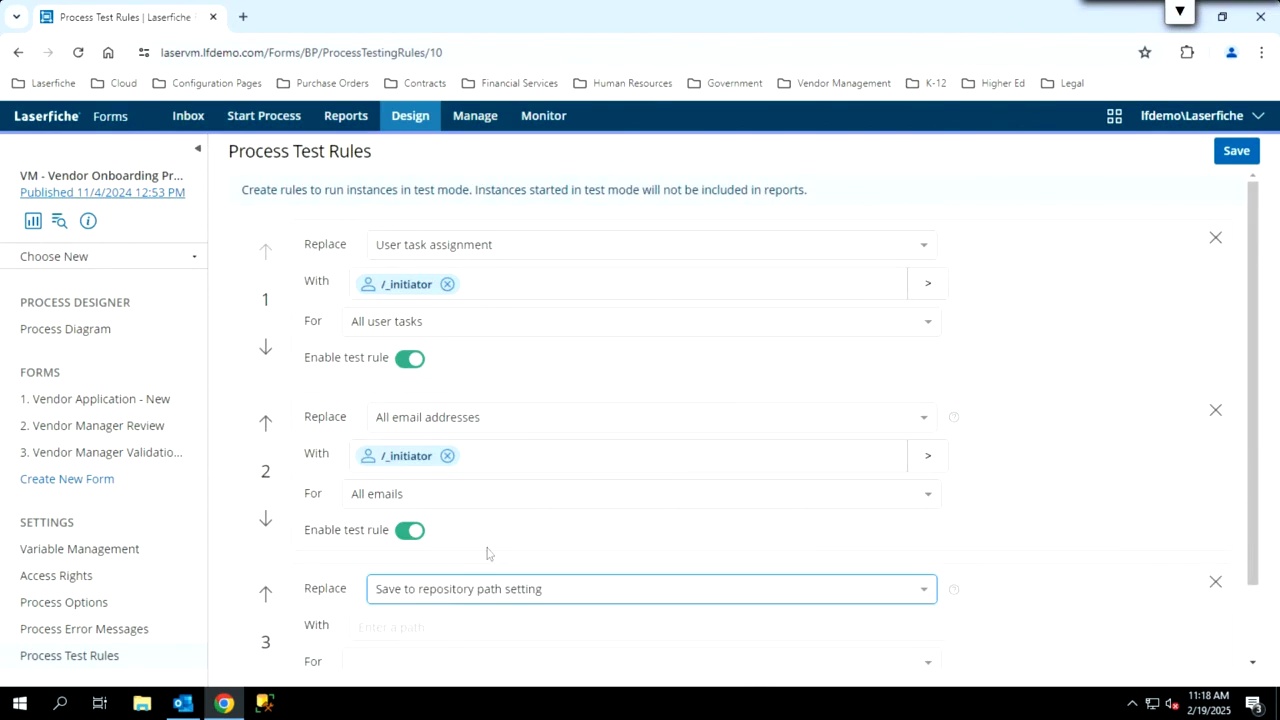
Nathan Whicker shows step-by-step how to work on a form in test mode.

Technical FAQs About Laserfiche 12 Upgrades
Can I upgrade directly to Laserfiche 12 from older versions?
Yes. You don't need to upgrade to version 10 or 11 first. Direct upgrades to Laserfiche 12 are fully supported.
Does upgrading require database migration?
No, provided you're running version 8.3 or later. Laserfiche 12 installs directly over your existing installation. SQL schema changes happen automatically during the upgrade process without manual intervention.
What are the minimum infrastructure requirements?
Laserfiche 12 requires:
Microsoft SQL Server 2014 SP3 or above
Windows Server 2016 or newer
Review the complete Laserfiche-supported OS list for detailed specifications.
These requirements align with most government infrastructure already in place, minimizing additional hardware or licensing costs.
Your Next Steps
Fill out the form below or email your account executive today! You’ll be enjoying the benefits of easier Laserfiche administration in no time.