
Big Island, Big Mission
County of Hawaii launched a Nonprofit Grants-in-Aid Program to support organizations improving quality of life across the Big Island. The program allocated up to $2.5 million. One challenge stood in the way: they needed a complete grant application system ready in less than 30 days.
Daily Detour: Paper Forms and Impossible Deadlines
The County faced a critical timeline. Nonprofit organizations needed to apply for funding, but no digital application system existed. Traditional procurement and implementation timelines wouldn’t work. They needed a solution that could go live immediately without sacrificing functionality or security.
Manual grant processing wasn’t an option at this scale. Staff required automated workflows, document management, and reporting capabilities from day one.
About our Client
CLIENT NAME:
POPULATION:
est. 209,790 residents
SOLUTIONS:
The Solution: Fast Deployment, Full Features
MCCi built the grant portal using Laserfiche Forms and Workflow. The system includes ten application pages with intelligent navigation. Applicants can save drafts and return later using email authentication. Required fields are clearly marked. The system validates completeness before submission.
Document uploads attach directly to applications. Workflow automatically routes submissions to County staff and sends confirmation emails to applicants. All documents are saved in Laserfiche repository folders based on compliance requirements. Related documents link together across folders.
The reporting dashboard provides real-time analytics. Staff can view application data in customizable columns, export to Excel or CSV, and schedule automated reports. Performance metrics track processing times and workload distribution.
The Result: On Time, On Target
The grant portal launched within the 30-day deadline. Nonprofit organizations submitted applications digitally. County staff reviewed submissions using automated workflows. Document management met compliance standards.
The system processed the complete $2.5 million allocation cycle. Applicants received immediate submission confirmations. Staff gained visibility into application status and program analytics. The County established a repeatable process for future grant cycles.
See it in Action
Get more good days done with Laserfiche’s complete toolset for securing documents, automating repetitive tasks, and meeting compliance requirements.
The first page of the application provides the details of the Grant Application, including due dates, special instructions, and contact information. It also includes a drop-down list of all application pages. Users can either select a page from the drop-down list or click ‘Next’ to navigate to the next page.
Applicants can save their application as a draft and return to complete it later. If saved as a draft, the form will ask for an email address and password. This is required to access the application form and complete it. A link to the form will be emailed to the applicant.
Each page includes page navigation buttons at the bottom, allowing the applicant to easily move from page to page.
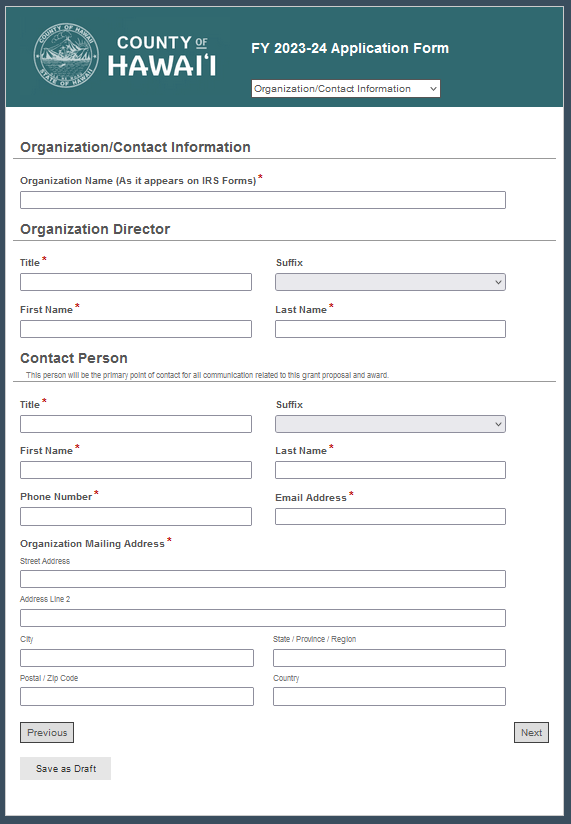
The second page of this multi-page form is where information about the nonprofit organization applying for the grant is entered. A red asterisk (*) identifies a required field that must be completed before the application can be submitted. NOTE: Applicants can navigate between pages, but cannot apply if any of the required fields are blank.
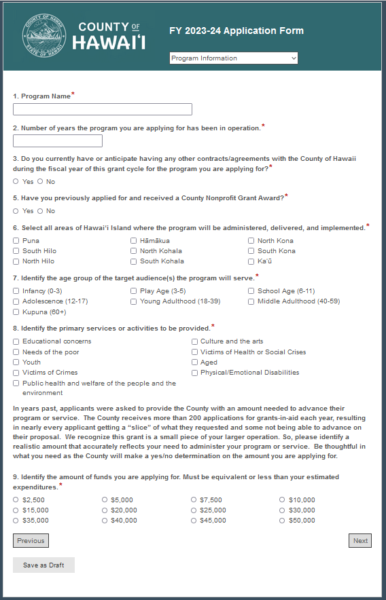
The next few pages of the application are used to collect information about what the Grant will be used for and include various form fields, such as text boxes for narrative responses, radio buttons (for yes/no responses), and multiple-choice responses. Again, the red asterisk identifies required fields.
Page 7 of the application allows applicants to enter program budget information. Laserfiche workflow will automatically calculate the Totals based on the numbers entered in the Form fields.
The next two pages request documents to be uploaded to this form. Applicants can upload the requested documents by selecting the ‘Upload’ button and choosing the document from their computer. If the applicant does not have the requested documents ready, they can select Save as Draft and upload the documents later. Any documents attached when Save as Draft is selected will be maintained; applicants will not need to upload them again. The attached documents uploaded to these pages will be saved in the Laserfiche repository along with the completed form.

Once the application is complete and all required documents have been uploaded, the applicant can submit the form for processing. This will send an email notification to the appropriate County staff notifying them that they have a grant application to review. The applicant will also receive an email notification alerting them that their application has been submitted for processing.
Workflow will route the attached documents to the appropriate folder in Laserfiche. Each document can be saved to a separate folder for compliance. Related documents can be linked to each other, and any document in the linked group can be accessed from any other document in the group, even if they are stored in separate folders.
