
Get More Good Days Done™
with Laserfiche AI

Say goodbye to daily detours
Your city clerk or records manager spends 45 minutes searching for information across multiple files or manually types data from handwritten forms. These aren’t occasional detours. They happen multiple times per day, across every department.
Manual document processing creates bottlenecks that slow down the entire process. Staff work overtime to catch up. The real cost isn’t just time. It’s the opportunity cost of skilled professionals doing work that intelligent software can handle in seconds.




What is Laserfiche AI?
Your team manages thousands of documents. Records requests pile up. Meeting minutes need review. Contract data requires extraction. These tasks consume hours of staff time that could be spent serving citizens.
Laserfiche AI features bring practical intelligence to your document management workflows. This isn’t about replacing your team. It’s about giving them tools that eliminate repetitive tasks and surface information faster.
As a trusted Laserfiche solution provider, MCCi helps government agencies implement AI-powered document management that fits your security requirements, budget constraints, and compliance needs. Our Laserfiche training and Laserfiche support ensure your team maximizes these capabilities from day one.
Laserfiche AI Features
Laserfiche developed AI features specifically for organizations that handle large volumes of unstructured data. Government agencies, school districts, and public sector entities manage exactly this type of content.
Practical Intelligence for Document-Intensive Government Work
Laserfiche AI integrates Generative Artificial Intelligence directly into your Enterprise Content Management platform. It analyzes document content, extracts data, answers questions, and automates processes that previously required manual review.
This technology works with your existing documents. No migration required. No system overhaul needed.
The AI operates within Laserfiche Cloud’s security framework. Your data stays private. Models aren’t trained on your content. Access controls remain intact.
For government agencies, this means you can adopt AI capabilities without compromising security protocols or compliance requirements. You get the efficiency benefits without the data privacy concerns.
As experienced Laserfiche partners, we help agencies evaluate which AI features deliver the most value for their specific workflows. Our Laserfiche customer support team provides ongoing guidance as your needs evolve.
Extract Data Without Programming
What if you could capture any information from any document type just by describing what you need in plain language?
Smart Fields automatically extracts key information from documents in seconds. You write a short description. Laserfiche identifies and captures the data. The system populates fields that trigger workflows, route documents, or generate reports.
No template matching required. No format limitations. No programming knowledge needed.
How It Works:
You configure a template by adding field descriptions in natural language. “Contract effective date,” “Vendor tax ID,” or “Applicant email address.” Select “Automatically Extract Values.” Laserfiche AI analyzes documents and pulls the information you specified.
The extracted data integrates immediately with your workflows. Route purchase orders based on amount. Trigger approvals based on department. Generate reports based on application status.
Find Answers Hidden in your Documents
What if you could ask your document repository questions the same way you’d ask a colleague?
Smart Chat uses an AI chatbot to surface information and insights from documents stored in your Laserfiche repository. Type questions naturally. Get relevant answers based on actual document content.
This isn’t a keyword search. It’s contextual understanding.
How It Works:
Open Smart Chat from the Document Viewer, Folder Browser, or Search Results Page. Type your question in conversational language. The AI analyzes up to 100 documents and provides answers with links to source documents.
The system maintains conversation history. Ask follow-up questions. Refine your queries. Build on previous responses. The context carries through your session.
Review Large Documents Faster
What if you could understand the key points of a 200-page document in 60 seconds?
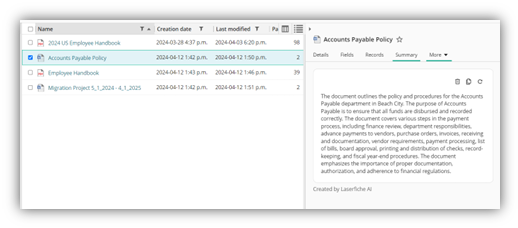
Document Summarization generates concise overviews of lengthy documents automatically. Review meeting packets before sessions. Assess policy documents before discussions. Understand contract terms without reading every clause.
How It Works:
Select a document. Click “Summarize.” View the summary in the Summary tab. The AI extracts key points, main arguments, and critical details while maintaining context.
Summaries work with multiple formats. Scanned documents. PDFs. Office files. Audio recordings. Video files.
Share summarized information directly via email. Include the summary when forwarding documents to colleagues or responding to information requests.
Process Handwritten Documents Automatically
What if handwritten forms could populate your database just like typed documents?
Handwriting Recognition extracts text from handwritten documents with the same accuracy as typed text. Field inspection reports. Permit applications. Meeting signup sheets. Any handwritten content becomes machine-readable data.
How It Works:
The feature uses advanced machine learning to analyze handwriting styles. It adapts to different penmanship. It improves accuracy through continuous optimization.
Configure Capture Profiles to process handwritten documents automatically when they arrive. Extract names, addresses, amounts, dates, and other critical data without manual transcription.
Automate Accounts Payable Data Entry
What if invoices populated your financial system automatically, without staff typing a thing?
Smart Invoice Capture uses machine learning to extract data from vendor invoices automatically. Invoice numbers. Dates. Amounts. Tax information. Line items. Everything your accounts payable team currently types manually.
How It Works:
Configure a capture profile using your standard invoice template fields. The system automatically identifies and extracts data.
Smart Invoice Capture can look up vendors in your database automatically based on invoice information. It matches incoming invoices to existing vendor records.
The system provides confidence scores for each data point. Green indicates high confidence. Blue shows medium confidence. Red flags low confidence items for review.
You set the confidence thresholds that trigger manual review. Balance automation speed with accuracy requirements.
Create Automation Rules
What if you could build complex data validation rules without knowing technical syntax?
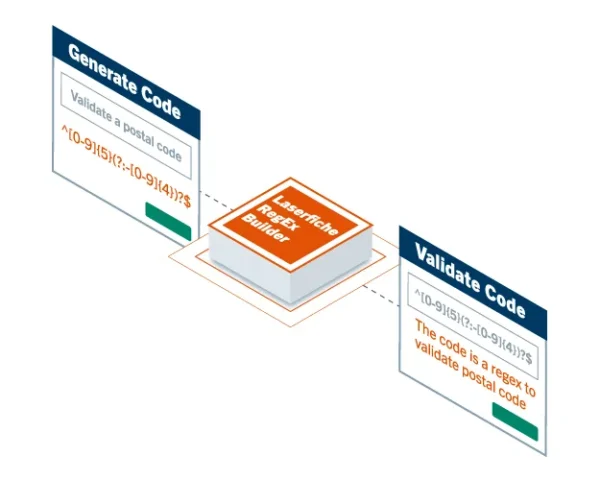
Regular Expression Builder translates natural language into working regular expressions. Describe what you want to find, display, constrain, or extract.
The AI generates the technical expression needed.
This feature opens workflow automation to users who aren’t programmers. No regex syntax required. No coding background needed.
How It Works:
Describe your requirement in everyday language. “Email addresses only” or “Phone numbers with area codes” or “Dates in MM/DD/YYYY format.” The AI generates the corresponding regular expression code.
Test the expression. Adjust if needed using plain language. Deploy in your forms and workflows.
Technical FAQs About Laserfiche AI
Can I start with one department before rolling out organization-wide?
Absolutely. Many agencies pilot AI features in one department first. This approach allows you to demonstrate value, refine processes, and build organizational confidence before expanding.
Can AI features handle documents in languages other than English?
Yes. Audio Video Transcription supports multiple languages. Other features primarily support English currently, with additional language support planned. Contact us about specific language requirements.
What happens if the AI extracts data incorrectly?
Features like Smart Invoice Capture include confidence scoring. You set thresholds for manual review. This ensures accuracy while maintaining efficiency. Staff review low-confidence extractions before processing.